
ASME B3IG Maximum Allowable Longitudinal Extent of Corrosion
The depth of a corrosion pit may be expressed as a percent of nominal wall thickness of pipe by:
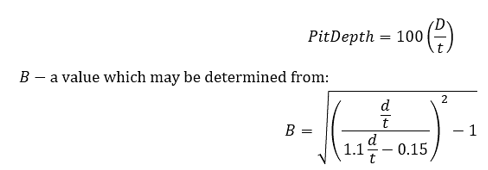
where
𝑑 − measured maximum depth of the corroded area(in)
𝑡 − nominal wall thickness of pipe,inches.
Additional wall thickness required for concurrent external loads shall not be included in the calculation.
A contiguous corroded area having a maximum depth of more than 10% but less than 80 % of the nominal wall thickness of the pipe should not extend along the longitudinal axis of the pipe for a distance greater than that calculated from:
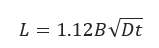
where
𝐿 − maximum allowable longitudinal extent of the corroded area(in)
𝐷 − nominal outside diameter of the pipe(in)
𝑡 − nominal wall thickness of pipe,inches.
B may not exceed the value 4. If the corrosion depth is between 10% and 80%, use B = 4.0 in Equation.
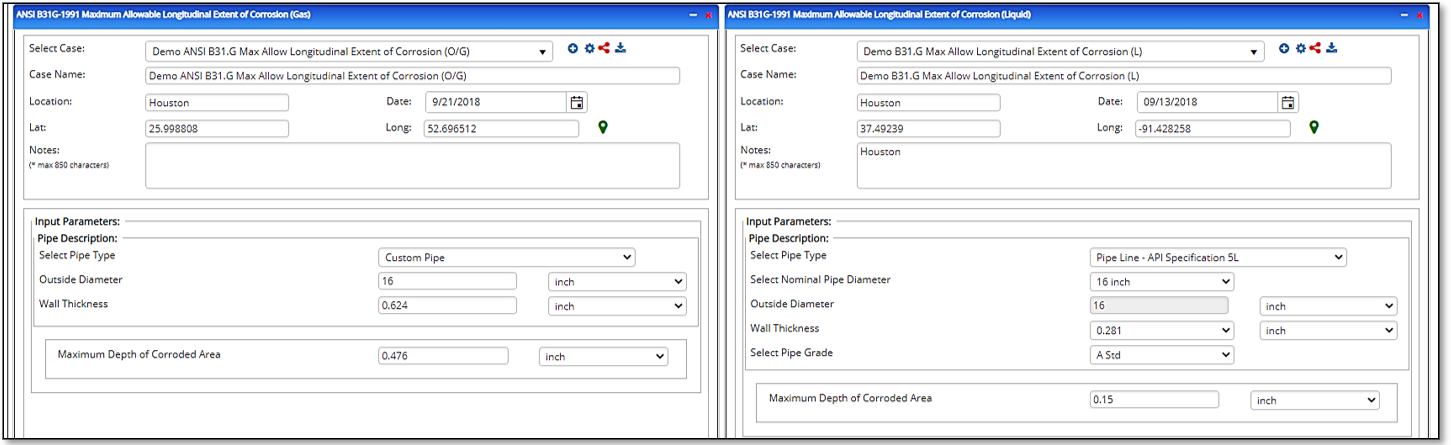
Input Parameters
- Select the ANSI B31G-1991 Maximum Allowable Longitudinal Extent of Corrosion application from the Pipeline Corrosion list.
- Enter Case Name, Location, Date and any necessary notes.
- Fill out all required fields.
- Make sure the values you are inputting are in the correct units.
- Click the CALCULATE button.
- Maximum Depth of Corroded Area(in)
- Pipe Outside Diameter(in)
- Nominal Pipe Wall Thickness(in).
Outputs/Reports
- View the results.
- If an input parameter needs to be edited be sure to hit the CALCULATE button after the change.
- To SAVE, fill out all required case details then click the SAVE button.
- To rename an existing file, click the SAVE As button. Provide all case info then click SAVE.
- To generate a REPORT, click the REPORT button.
- The user may export the Case/Report by clicking the Export to Excel/PowerPoint icon.
- To delete a case, click the DELETE icon near the top of the widget.
- Maximum Allowable Longitudinal Extent of Corrosion(in)

Related Links
Table of Contents
Table of Pages
Table of Contents
- Pipeline HUB User Resources
- AC Mitigation PowerTool
- API Inspector's Toolbox
- Horizontal Directional Drilling PowerTool
- Crossings Workflow
- Hydrotest PowerTool
- Pipeline Toolbox
- Encroachment Manager
- PRCI AC Mitigation Toolbox
- PRCI RSTRENG
- RSTRENG+
- Ad-hoc Analysis
- Database Import
- Data Availability Dashboard
- ESRI Map
- Report Builder
- Crossings Workflow
- Hydrotest PowerTool
- Investigative Dig PowerTool
- Hydraulics PowerTool
- External Corrosion Direct Assessment Procedure - RSTRENG
- Canvas
- Definitions
- Pipe Schedule and Specifications Tables