
Reciprocating Pump – Displacement and Actual Capacity
A Reciprocating Pump uses reciprocating motion to cause a fluid to be moved from one location to another. The most common is the positive displacement type.
Capacity is limited by the pump speed and number of plungers/pistons available along with other mechanical considerations such as the crankshaft and slider mechanism.
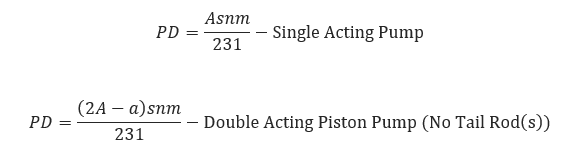
𝑃𝐷 − Displacement is the Volume Swept by all Pistons or Plungers per Unit of Time [gpm]
𝐴 − Piston or Plunger Area [in2]
𝑎 − Piston Rod Cross Sectional Area [in2] (Double Acting Piston Pump)
𝑠 − Stroke Length [in]
𝑛 − Crankshaft Rotational Speed [rpm]
𝑚 – Number of Pistons or Plungers
Actual Capacity
𝑄 = 𝑛𝑃𝐷 • 𝑉𝐸
𝑄 − Actual Pump Capacity [gpm]
𝑛 − Number of Pistons/Plungers
𝑉𝐸 − Volumetric Efficiency (Fraction)
Input Parameters
- To create a new case, click the “Add Case” button
- Select the Pump Specific Speed application from the Pipeline Pumps module.
- Enter Case Name, Location, Date and any necessary notes.
- Fill out all required fields.
- Make sure the values you are inputting are in the correct units.
- Click the CALCULATE button
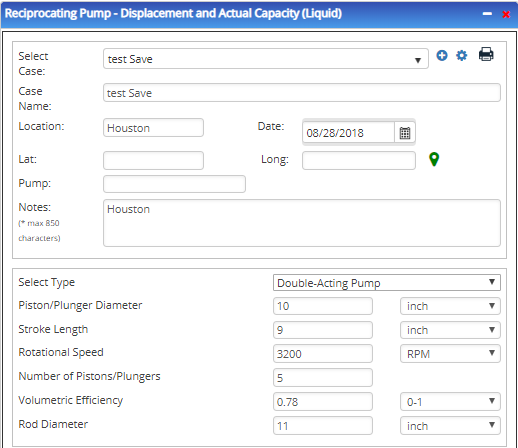
- Piston/Plunger Diameter [in]
- Stroke Length [in]
- Rotational Speed [rpm]
- Number of Pistons/Plungers
- Volumetric Efficiency (Fraction)
Outputs/Reports
- View the results.
- If an input parameter needs to be edited be sure to hit the CALCULATE button after the change.
- To SAVE, fill out all required case details then click the SAVE button.
- To rename an existing file, click the SAVE As button. Provide all case info then click SAVE.
- To generate a REPORT, click the REPORT button.
- The user may export the Case/Report by clicking the Export to Excel/PowerPoint icon.
- To delete a case, click the DELETE icon near the top of the widget.
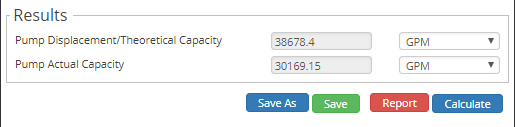
- Pump Displacement/Theoretical Capacity [gpm]
- Pump Actual Capacity [gpm]
Related Links
Table of Contents
Table of Pages
Table of Contents
- Pipeline HUB User Resources
- AC Mitigation PowerTool
- API Inspector's Toolbox
- Horizontal Directional Drilling PowerTool
- Crossings Workflow
- Hydrotest PowerTool
- Pipeline Toolbox
- Encroachment Manager
- PRCI AC Mitigation Toolbox
- PRCI RSTRENG
- RSTRENG+
- Ad-hoc Analysis
- Database Import
- Data Availability Dashboard
- ESRI Map
- Report Builder
- Crossings Workflow
- Hydrotest PowerTool
- Investigative Dig PowerTool
- Hydraulics PowerTool
- External Corrosion Direct Assessment Procedure - RSTRENG
- Canvas
- Definitions
- Pipe Schedule and Specifications Tables